https://metalworks.online/
Explore part-time, self-paced online courses designed by the industry professionals at Metalworks Institute—Canada’s premiere school for music and entertainment. Whether you’re diving into audio production, recording, music business, or songwriting, earn a recognized certificate and gain real-world skills from the comfort of your own home.
Shareable Certificate
Taught in English
Course Evaluations:
5 Quizzes & 1 Final Exam
Course Availability:
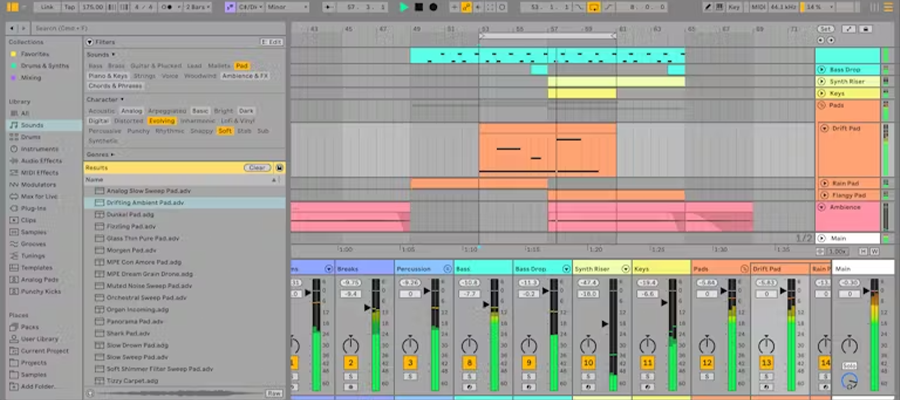
On-Demand Ableton Live I – Fundamentals introduces students to the core tools and workflows of Ableton Live, focusing on building a solid foundation in music production. Students will explore the unique dual-view workflow of Session View for idea generation and Arrangement View for structured composition, while learning how to record and edit audio and MIDI, apply warping techniques, and work with clips and tracks. The course also covers using Ableton’s built-in instruments and devices, applying automation for dynamic changes, and arranging clips into complete songs.
This module introduces students to Ableton Live’s origins, design philosophy, and unique interface. The emphasis is on understanding its historical background, its two-view design (Session vs. Arrangement), navigation tools, audio/MIDI setup, and project management fundamentals. By the end, students will be able to confidently explain how Live developed, why it differs from other DAWs, and how to begin using it efficiently.
This module focuses on how to record audio and MIDI into Ableton Live and introduces students to one of Live’s most revolutionary features: Warping. Recording allows us to capture performances from instruments, voices, or MIDI controllers, while warping lets us correct timing issues, match loops to tempo, or completely transform audio for creative purposes. By mastering these concepts, students will be able to record professional-quality material, edit it flexibly, and make it rhythmically consistent with any project.
This module dives into the building blocks of Ableton Live: tracks and clips. Students will learn how to create and organize different track types, manipulate clips, and refine recordings with Ableton’s editing tools. The module also explores creative techniques like using clip envelopes, applying groove, and managing time signatures. By the end, students will be able to edit both audio and MIDI with precision, organize their sessions effectively, and shape performances into polished material.
This module introduces students to Ableton Live’s built-in devices, instruments, and sound design tools. Students will learn the differences between audio and MIDI effects, explore Live’s stock instruments, and understand how to combine devices into racks for creative sound design. The module also covers signal flow, return tracks, macros, and preset management. By the end, students will be able to design custom sounds, build instrument chains, and confidently use devices in both production and performance.
This final module is where creativity becomes production. While the first four modules introduced ideas, tools, and performance workflows, Module 5 focuses on developing those ideas into complete songs and preparing them for real-world use. Students will learn to capture live performances, edit and refine arrangements, apply automation, organize projects for professional use, and finally export finished tracks in multiple formats. This module emphasizes professional practices that prepare students for collaboration, live performance, and distribution.
Required Hardware (minimum):
Laptop Computer (PC or Mac)
Ableton Live Software Recommended
Specifications:
Minimum 3.0 GHz Processor
16GB RAM (64 Bit)
256GB SSD
Ableton Live II – Advanced Techniques builds on the fundamentals...
Ableton Live II – Advanced Techniques builds on the fundamentals by guiding students through advanced techniques for creating, shaping, and performing music in Ableton Live. The course explores complex audio and MIDI workflows, advanced warping,...